



Academic publications care about formatting and its peculiarities because they adhere to a standard of excellence, make it easy to track and verify sources, and communicate to readers consistently and effectively.
Here is a guide for students in the Humanities on Turabian formatting, dash types, quotation marks, and other formatting essentials for writing a scholarly paper using the Turabian style, based on the Chicago Manual of Style (17th ed.).
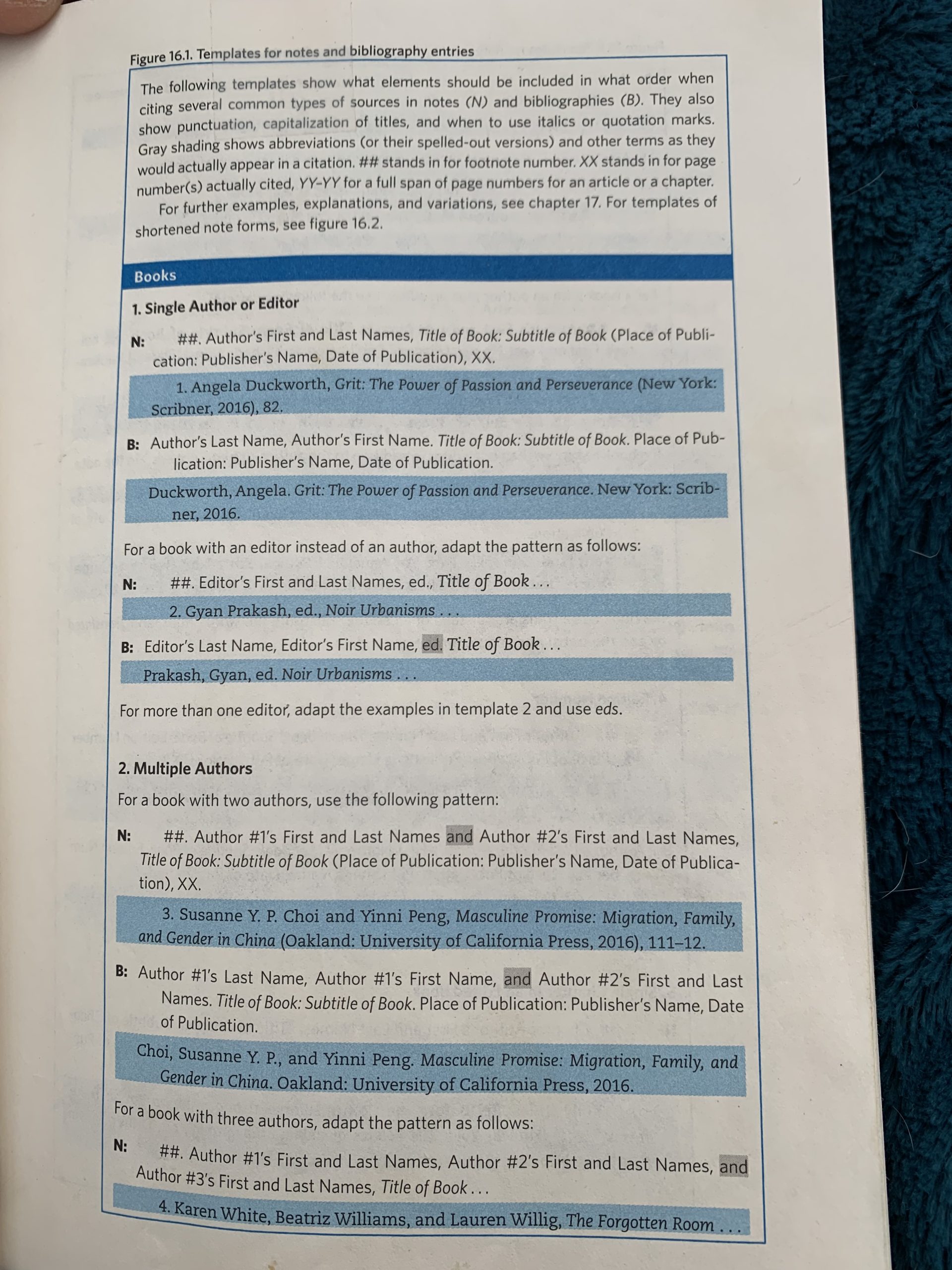
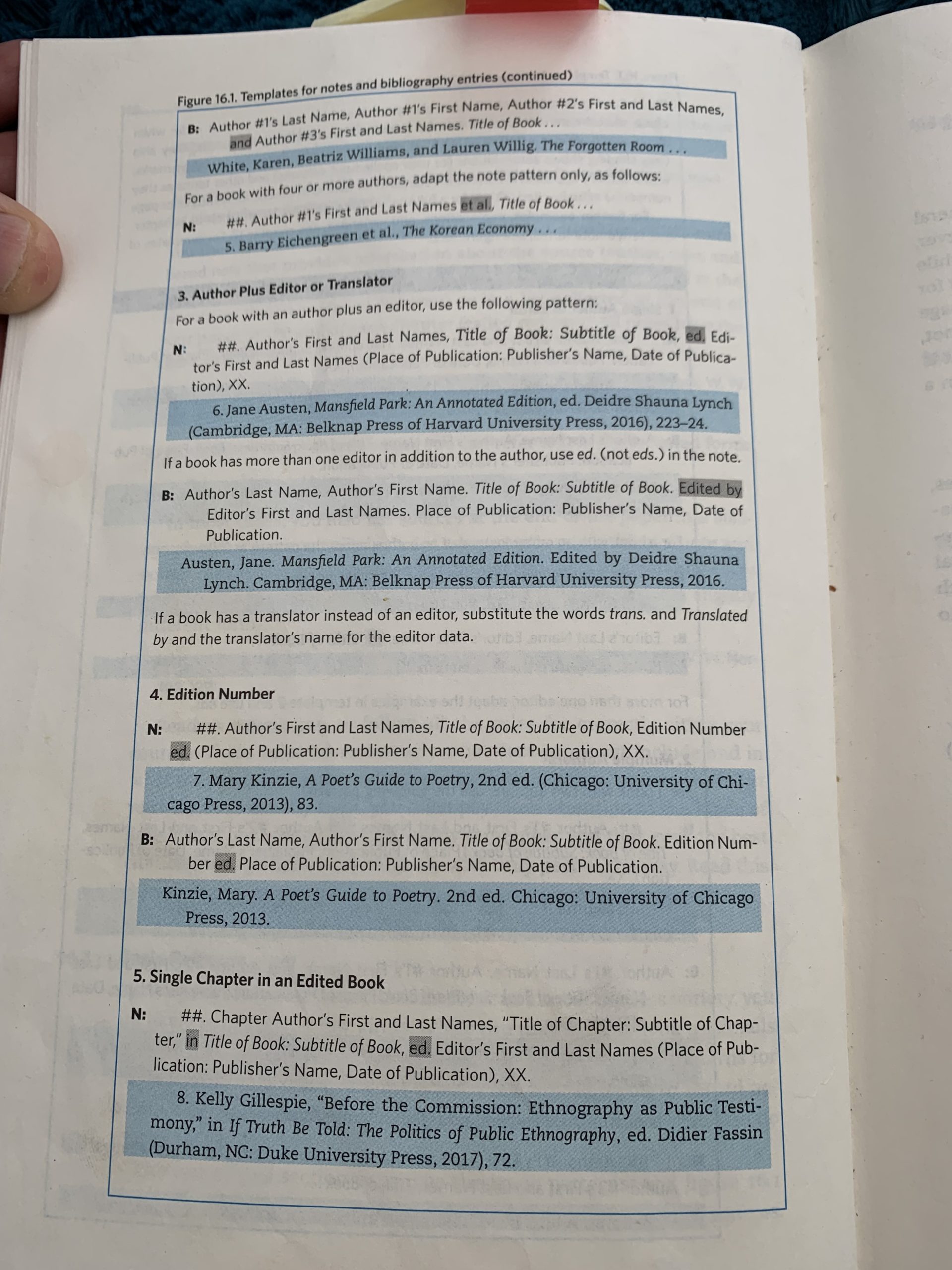
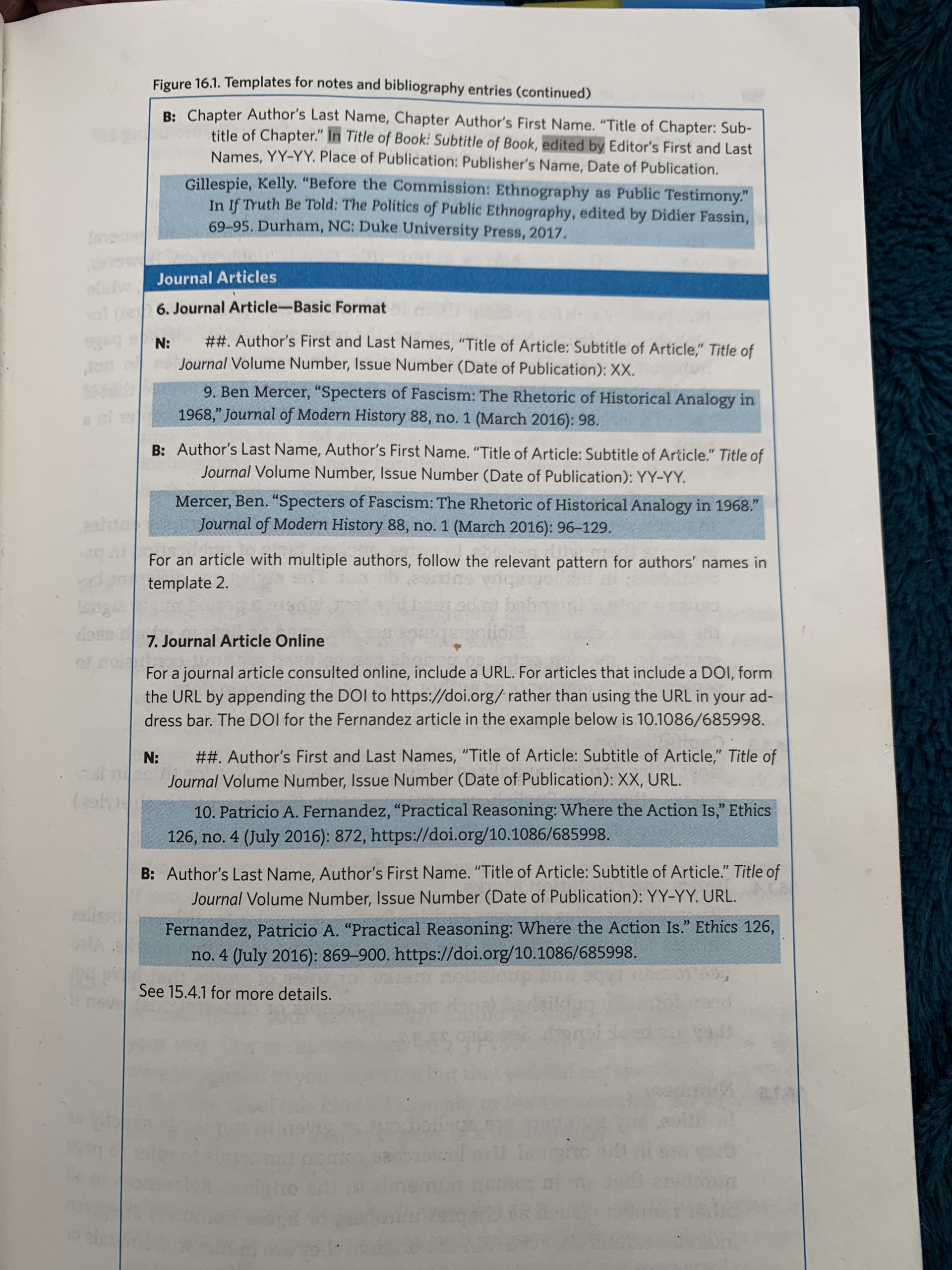
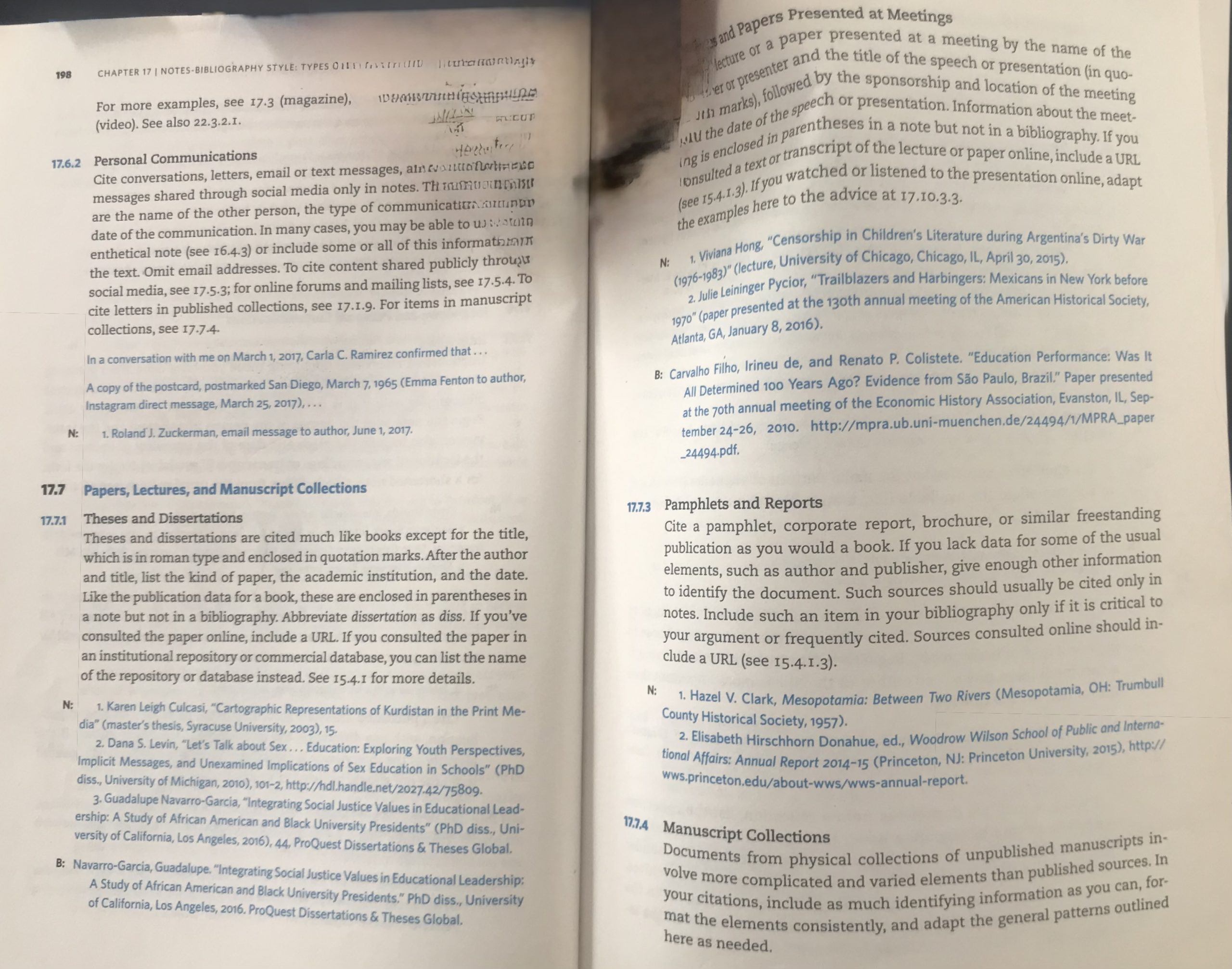
Refer to Turabian: A Manual for Writers, particularly pages that explain how to format footnotes and bibliographies as seen below. The key difference is that footnotes separate items with commas, while bibliographies use periods. Notice there are no commas before or after using parentheses in footnotes. Also, notice that the year of publication is never in parentheses immediately after the author’s name, as can be found in scientific journals. AI often formats it this wrong way for papers in the Humanities.
How to format Stephanus numbers.
I. Dashes and Hyphens: When and How to Use Them
1. Hyphen (‐)
- Used to join compound words (e.g., well-being, twenty-four, Greek-speaking philosopher).
- Not used to indicate breaks in thought or sentence structure.
How to type it: Standard hyphen key on any keyboard: -
2. En-dash (–)
- Used for ranges: dates, page numbers, etc.
- Example: pp. 24–36, 400–347 BCE
- Also used in compound adjectives where one element is open or already hyphenated:
- Example: pre–Socratic-era dialogue, Plato–Aristotle relationship
How to type it:
- Mac:
Option+- - Windows:
Alt+0150on numeric keypad (holdAlt, type0150, release)
Typing an en-dash (–) on an iPad Pro requires a small workaround, because the standard iPad keyboard does not directly show the en-dash as a visible key. However, you can easily insert it using one of these methods:
✅
Method 1: Tap-and-Hold the Hyphen Key
- Open any app where you can type (e.g., Notes, Word, Pages).
- Tap and hold the hyphen – key on the iPad onscreen keyboard.
- A popup menu will appear with punctuation options.
- Slide your finger to select the en-dash (–) and release.
🟢 This method also often gives you access to the em-dash (—), depending on the app and keyboard version.
✅
Method 2: Use a Text Replacement Shortcut
- Go to Settings > General > Keyboard > Text Replacement.
- Tap the “+” icon.
- In Phrase, paste the en-dash: –
(You can copy this one right here.) - In Shortcut, type something like –n or en-
- Tap Save.
Now, typing –n will auto-replace with an en-dash.
✅
Method 3: Use an External Keyboard (Magic Keyboard or Bluetooth)
If you’re using a physical keyboard (e.g., Apple Magic Keyboard):
- En-dash (–): Option + –
- Em-dash (—): Shift + Option + –
These are the same as on a Mac and will work identically on the iPad Pro.
✅
Method 4: Copy and Paste
You can always copy this en-dash right here and keep it in your Notes app for quick access:
– ← en-dash
— ← em-dash
Summary Table for iPad Pro
| Dash Type | Symbol | Onscreen Keyboard | Physical Keyboard Shortcut |
| Hyphen | – | Direct key | – |
| En-dash | – | Hold -, select | Option + – |
| Em-dash | — | Hold -, select | Shift + Option + – |
Use Method 1 or 3 if you want consistent typographical control in academic papers, especially when formatting page ranges (e.g., 201–210) or compound modifiers involving open compounds (e.g., Plato–Socrates comparison).
3. Em-dash (—)
- Used for interruption, apposition, or emphasis:
- Example: The argument is unresolved—but intentionally so.
- No spaces before or after in Turabian.
How to type it:
- Mac:
Shift+Option+- - Windows:
Alt+0151
II. Quotation Marks: Double and Single
1. Double Quotation Marks (“ ”)
- Used for all direct quotations in your prose.
- Example: Socrates says, “Knowledge is perception.”
2. Single Quotation Marks (‘ ’)
- Used only within a quotation.
- Example: “Then he said, ‘Define knowledge for me,’ which Theaetetus did.”
3. Punctuation Placement
- Periods and commas go inside the quotation marks:
- Example: Plato writes, “Justice is the concern of all.”
- Colons and semicolons go outside.
- Question marks and exclamation points go inside if part of the quotation, outside if part of your sentence.
III. Short Quotations vs. Block Quotations
1. Short Quotations (Fewer than 5 lines of prose)
- Enclosed in double quotation marks.
- Incorporated into your paragraph.
- Use parenthetical or footnote citations.
2. Block Quotations (5 lines or more)
- No quotation marks.
- Indented one-half inch from the left.
- Single-spaced.
- Citation follows at the end, often in a footnote or parenthesis.
Example (Block Quotation):
Socrates warns:

Knowledge is not the same thing as true belief, for a man may believe the truth and still not know it, unless he has been given an account of the reason why the belief is true. That is the essence of knowledge: a justified, true belief. (Theaetetus, 201c–d)
IV. Formatting Footnotes and Bibliographies (Turabian Notes-Bibliography Style)
1. Footnotes (First Use Format)
Include:
- Author’s full name
- Title of book (italicized)
- Editor/Translator (if any)
- Publication info in parentheses
- Page number
Example:
- Seth Benardete, The Being of the Beautiful: Plato’s Theaetetus, Sophist, and Statesman, ed. Ronna Burger (Chicago: University of Chicago Press, 1984), 46.
2. Footnotes (Subsequent Uses)
- Shortened form:
- Benardete, Being of the Beautiful, 46.
3. Bibliography Format
- Author’s last name first
- Inverted names only for the first author
- Title italicized
- Hanging indent
Example:
Benardete, Seth. The Being of the Beautiful: Plato’s Theaetetus, Sophist, and Statesman. Edited by Ronna Burger. Chicago: University of Chicago Press, 1984.
Tips:
- Alphabetize entries by last name.
- Use an en-dash for page ranges: 211–52
- Double-space the bibliography but use single spacing within entries.
V. How to Use Ellipses in Quotations Correctly
The Associated Press (AP) style is three dots without any spaces ( … ) that is NOT used in the Humanities (although often used by AI models). For philosophy papers, use The Chicago Manual of Style (CMS) and Modern Language Association (MLA) format that puts spaces between each period ( . . . ). If the ommitted material ends the sentence in a final period use FOUR periods (”Four score and seven years ago . . . . ). When in doubt, consult the appropriate style guide.
With an ellipsis, you can omit words, phrases or sentences when you’re quoting. Note: You never want to omit words, phrases or sentences that will change the context or facts of a quotation.
VI. Formatting Titles: How to Refer to “Theaetetus”
1. In Running Text
- The title of a Platonic dialogue like Theaetetus should be italicized (not in quotes).
Example: Theaetetus begins with a conversation between Euclides and Terpsion.
2. In Titles of Papers or Articles
- Italicize Theaetetus unless your own article title is italicized (e.g., in a journal).
- Never use quotation marks for Theaetetus (those are for article titles, not dialogue titles).
Correct in Paper Title:
- “Defining Knowledge in Plato’s Theaetetus”
Incorrect:
- “Defining Knowledge in ‘Theaetetus’”
VII. Additional Formatting
- Font: Times New Roman, 12 pt.
- Margins: 1 inch all sides.
- Spacing: Single-spacing for all text for this NAU class.
- Page numbers: As you are not using a title page, number your paper starting on the second page with the number two and every page after that with the next consecutive number including any end note pages or bibliography. There are no numbers on the first page.
- Title Page: Follow instructor’s or department’s standard.
VIII. Quick Keyboard Shortcuts Summary
| Mark | Name | Mac Shortcut | Windows Shortcut |
|---|---|---|---|
| – | Hyphen | Just type - | Just type - |
| – | En-dash | Option + - | Alt + 0150 |
| — | Em-dash | Shift + Option + - | Alt + 0151 |
| “ ” | Double Quotes | Standard Key | Standard Key |
| ‘ ’ | Single Quotes | Inside double quotes | Inside double quotes |
IX. Examples of Citations for Theaetetus Editions
- In Footnote:
- Plato, Theaetetus, trans. M. J. Levett, rev. Myles Burnyeat (Indianapolis: Hackett, 1992), 187a–b.
- In Bibliography:
Plato. Theaetetus. Translated by M. J. Levett. Revised by Myles Burnyeat. Indianapolis: Hackett, 1992.
For students, correct formatting is not an optional flourish—it is the embodiment of academic precision and interpretive clarity. Treat the Turabian style as a philosophical discipline in its own right: governed by reason, structure, and the pursuit of truth through order.